LINQ to SQL: Prep Work
There are a number of great articles and blogs online for LINQ-to-SQL already. A great place to start is Scott Guthrie’s blog However, I am going to wade into the discussion with my own thoughts.
There are three pre-requisites for the examples I will be showing off
- Visual Studio C# 2008 Express Edition
- SQL Server 2005 Express Edition
- AdventureWorks Sample Database
All three should install in a straight forward manner. You can then create a new C# project inside Visual Studio and in the Database Explorer add a new connection to the AdventureWorks database file.
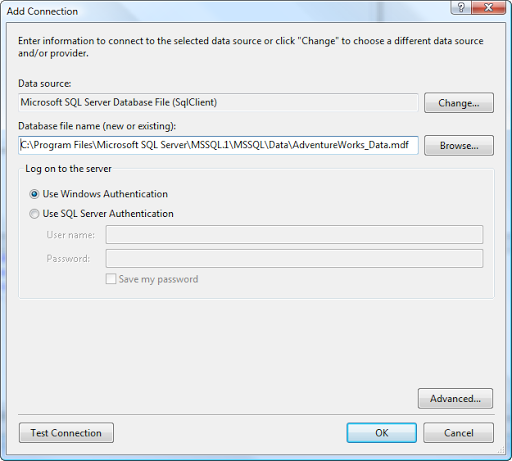
Note: Due to the connectivity restrictions of the Express editions, you will need to connect to the database file with a user instance. So do not attach the AdventureWorks database to your SQL Server/Express instance.
The next step is to add a set of LINQ-to-SQL classes to your project.
If you are new to all this you might not have made the distinction between LINQ and LINQ-to-SQL yet. So here is my 5 second overview.
LINQ is a set of extensions that provide a unified query syntax for various data structures such as Arrays and Collections among many others.
LINQ-to-SQL can pretty much be viewed as a Data Layer for a SQL Server back-end. There is a "wizard" that creates a set of classes by examining the structure of your database. This is what you need to do next and you fire it up by adding a New Item to your project.
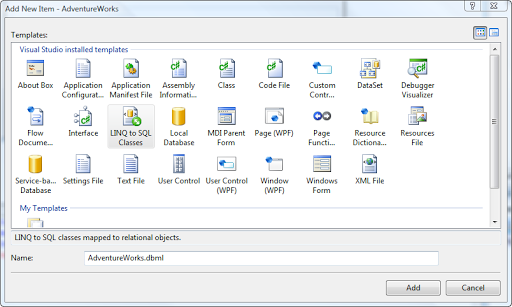
Open up the Database Explorer, drill into the AdventureWorks tables, select them all and drag/drop onto the design area. When prompted about copying the database file into the project, I tend to answer no as it creates deployment issues in test. However, if you want to keep the original copy clean, this might not hurt. You could also take a copy of the original and connect to it.
Now finally we want to hook up a button on our XAML page to a method in the code behind page so we have a hook to run some code on.
Window1.xaml
<Window x:Class="AdventureWorks.Window1"
    xmlns="http://schemas.microsoft.com/winfx/2006/xaml/presentation"
    xmlns:x="http://schemas.microsoft.com/winfx/2006/xaml"
    Title="Window1" Height="233" Width="534">
    <Grid>
        <Button Name="button1" Click="button1_Click">Button</Button>
    </Grid>
</Window>
Window1.xaml.cs
using System;
using System.Collections.Generic;
using System.Linq;
using System.Text;
using System.Windows;
using System.Windows.Controls;
using System.Windows.Data;
using System.Windows.Documents;
using System.Windows.Input;
using System.Windows.Media;
using System.Windows.Media.Imaging;
using System.Windows.Navigation;
using System.Windows.Shapes;

namespace AdventureWorks
{
    /// <summary>
    /// Interaction logic for Window1.xaml
    /// </summary>
    public partial class Window1 : Window
    {
        public Window1()
        {
            InitializeComponent();
        }

        private void button1_Click(object sender, RoutedEventArgs e)
        {
            AdventureWorksDataContext db = new AdventureWorksDataContext();

        }
    }
}
With the shell of our testing application now put together we can move on to actually seeing what LINQ-to-SQL is and why you should care about it.