Creating desktop apps with NodeJS
Last week an interesting thread was started on the NodeJS mailing list.
https://groups.google.com/d/msg/nodejs/iy7Re33dwyU/yxwLlx1aUNMJ
Roger Wang from the Intel Open Source Technology Center posted about a new project from their team called node-webkit.
https://github.com/rogerwang/node-webkit
node-webkit brings WebKit to NodeJS. With it, client side applications can be written with a HTML/CSS UI on the NodeJS platform. We believe the async I/O framework and Javascript language is a perfect combination for client (mobile) side applications.
Basically it allows you to write HTML/JS/Node client side applications using webkit as the renderer.
This is very interesting, and in some respects like the path Microsoft are taking with the HTML/JS WinRT in Windows 8.
Currently this is Linux only. But with Node and WebKit both being cross-platform, it is only a matter of time until it gets onto other platforms.
Getting started with a fresh Ubuntu 11.10 install in a VM I had to do the following to get it all installed.
- Open up a text editor and edit the file
/etc/apt/sources.list - Add a new line at the end
deb http://libwebkitnode.s3.amazonaws.com/ oneiric/
sudo apt-get update
sudo apt-get install git-core nodejs-dev libwebkitnode-dev libev-dev
git clone https://github.com/rogerwang/node-webkit.git
cd node-webkit
node-waf
configure build
You can then test it is running with node tests/helloworld.js tests/testfs.html
If everything goes to plan you, up should pop a window that lists the files in the current directory.
Take a look at the tests/testfs.html to see how they have done that.
Now on to my first test project. I am once again making a twitter search, it really is one of the easiest APIs around to quickly run up a test against.
All the below code is on github at https://github.com/csainty/node-webkit-twitter
One note, I put a copy of node-webkit into the node_modules folder. I am sure it will come to npm eventually, but for now this was the easiest method.
When I tried to reference it from it’s own folder, it could be found, but then my other dependencies couldn’t. I must be misunderstanding something there.
Our app.js is very simple, this is the entry point to the app, configures the webkit browser surface and loads an initial page.
var nwebkit = require('node-webkit');

nwebkit.init({
    'url' : 'index.html',
    'width' : 800,
    'height' : 600
});
index.html is also pretty straight forward, it is just basic HTML with Knockout bindings. It includes script references for jQuery, Knockout and our own index.js
<html>
<head>
    <title>node-webkit-twitter</title>
    <script src="jquery-1.7.1.min.js"></script>
    <script src="knockout-2.1.0pre.js"></script>
    <script src="index.js"></script>
</head>
<body>

<h1>node-webkit-twitter</h1>

<div>
    Enter a search term <input type="text" data-bind="value: searchTerm" />.<br/>
    <button data-bind="click: search">Search</button>
</div>

<ul data-bind="foreach: results">
    <li><span data-bind="text: text"></span></li>
</ul>

</body>
</html>
Now for index.js, this is where the really interesting code is.
var request = require('request');

$(function() {
    function IndexViewModel() {
        this.searchTerm = ko.observable();
        this.results = ko.observableArray();

        this.search = function() {
            var vm = this;
            request.get('http://search.twitter.com/search.json?q=' + this.searchTerm(), function (error, response, body) {
                if (!error && response.statusCode === 200) {
                    var tweets = JSON.parse(body);

                    $.each(tweets.results, function (index, item) {
                        vm.results.push(item);
                    })
                }
            });
        };
    }
    ko.applyBindings(new IndexViewModel());
});
You can freely mix your traditional browser based HTML with your node.
So we call in our dependency on the request module. We then use jQuery to delay our execution until the page is loaded. We use Knockout to create our ViewModel which binds itself to the HTML.
Then in the search function on the ViewModel we call out to request to fetch the data from twitter.
Now of cource everything in this little demo can be done client side already. But I wanted to keep it simple, we can get to the filesystem (as the intel demo shows) and we can use existing libraries to get to a database or other persistence layer.
To fire it up just run node app.js
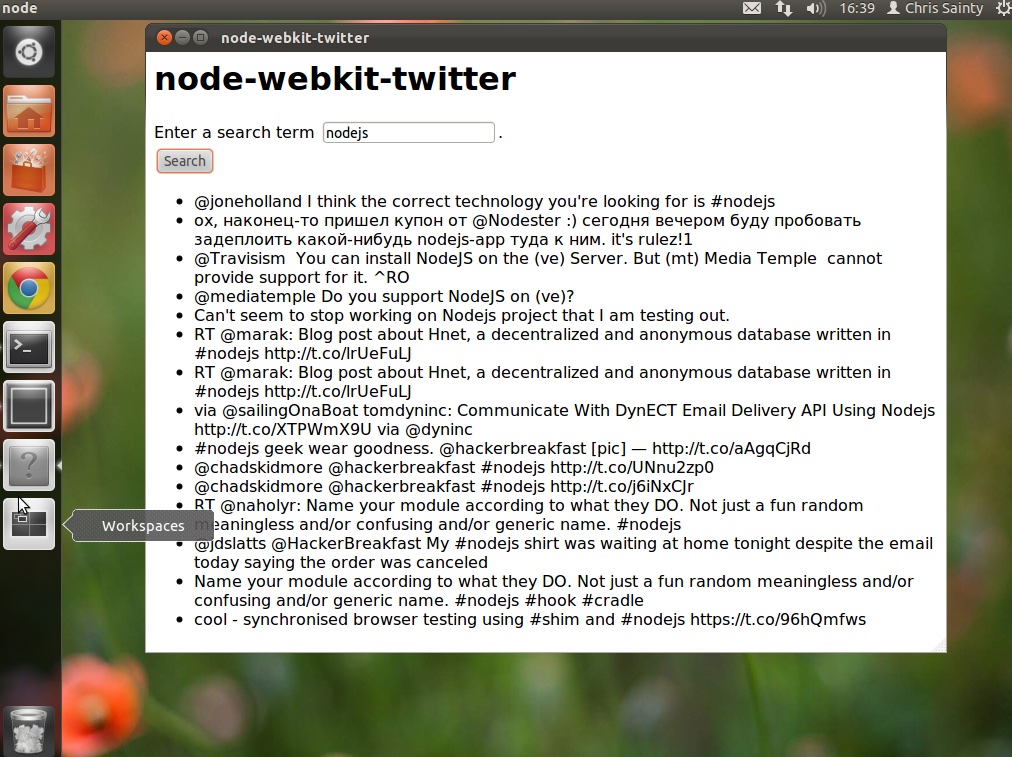
I hope to put together a more in-depth demo soon, one that involves local storage, and one of the HTML5 UI frameworks to pretty it up a bit. I’ll keep you posted on how that goes.
Remember I am on twitter these days as well @csainty. So follow me there if you want to know what I am up to.